Best Parental Control Apps for Android: Complete Parent's Guide
Children use Android phones and tablets for school, entertainment, communication, and increasingly, AI-powered apps and chatbots. For parents, choosing the best parental control app for Android is no longer only about limiting screen time or blocking websites.
A modern parental control app can help parents manage screen time, control apps, filter inappropriate content, and understand how children use their devices. As children increasingly interact with AI chatbots, another question is becoming important: can parents monitor and manage potentially unsafe AI interactions?
In this guide, we’ll compare important parental control features, explain what parents should look for in an Android parental control app, and highlight why AI safety and AI conversation monitoring are becoming increasingly relevant for families.
What Is a Parental Control App?
Smartphones and tablets are powerful tools for children, but they can also be gateways to:
-
Inappropriate content
-
Unsafe websites or chat apps
-
Excessive screen time
-
Online predators
Parental control apps give parents peace of mind by allowing them to monitor and manage their child’s device usage.
What Should You Look for in an Android Parental Control App?
Not all parental control apps are created equal. Here’s what to consider:
1. Screen Time Management
Apps should allow you to:
-
Set daily screen time limits
-
Schedule device usage
-
Pause device access remotely
This helps children balance technology with offline activities.
2. Content Filtering
Good apps filter websites, apps, and videos that are inappropriate for children. Look for:
-
Safe search enforcement
-
App category restrictions
-
Blocking adult or violent content
3. App Monitoring and Blocking
Some apps let you see which apps your child uses and block apps you consider unsafe. Features to look for:
-
Real-time app usage reports
-
App blocking by category or age
-
Notifications if a new app is installed
4. Location Tracking
Safety is not just about digital content. Many apps offer:
-
GPS location tracking
-
Geofencing alerts when children enter/leave specific areas
-
SOS alerts in case of emergency
5. AI Safety Monitoring
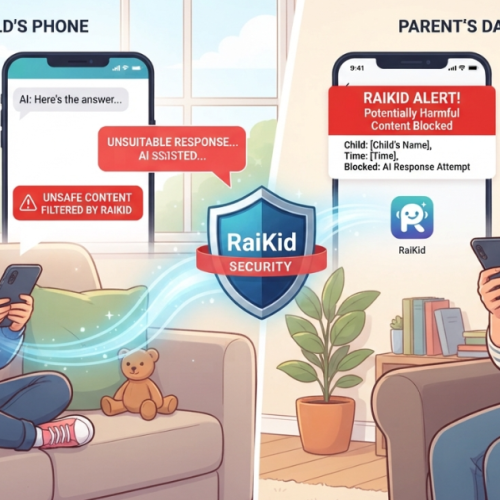
The latest parental apps now monitor AI interactions, helping parents ensure children are safe when using chatbots or educational AI tools.
For example, RaiKid is designed to:
-
Detect unsafe AI chatbot conversations
-
Alert parents of potential risks
-
Provide actionable tips to protect children online
Top 5 Parental Control Apps for Android
Here are some of the most reliable apps parents use today:
RaiKid combines parental controls with AI-specific safety and monitoring for children.
Google Family Link – Free, easy to set up, monitors app usage
Qustodio – Comprehensive dashboard, screen time management
Norton Family – Web filtering, location tracking, usage reports
Kidslox – Simple interface, screen time, and app blocking
Each app has its strengths, so parents should choose based on their child’s needs and their family’s digital safety goals.
Tips for Using Parental Control Apps Effectively
Communicate with your children – Explain why monitoring is important
Regularly review app reports – Keep track of behavior trends
Update apps frequently – Ensure the latest safety features are active
Combine digital rules with offline guidance – Balance technology use with real-world activities
Parental control apps are essential tools for protecting children in the digital world. They help manage screen time, filter content, and provide peace of mind to parents.
When combined with open communication, healthy tech habits, and AI monitoring tools like RaiKid, parents can ensure their children enjoy technology safely and responsibly.
Conclusion: Choosing the Best Parental Control App for Android
The best parental control app for Android depends on what your family needs most.
Traditional parental controls can help manage screen time, applications, websites, and device usage. But as children increasingly interact with AI chatbots, parents may also need tools designed specifically for AI safety and AI conversation monitoring.
If your priority is general Android device management, solutions such as Google Family Link and other established parental control platforms may be worth considering.
If your priority is helping your child use AI in a safer, more age-appropriate environment while giving parents greater visibility and control, RaiKid is designed specifically for that purpose.
The most effective approach is not simply to block technology. It is to combine appropriate parental controls with communication, digital safety rules, and age-appropriate technology.